
Ground reading
Where heavy material is likely to stop
Plain-language lessons for bends, bars, bedrock cracks, black sand, old channels, gossans, quartz, ironstone, and covered ground.
PFA Field Guide
The reference pile is useful, but the product should not ship copied social-media posters. This guide turns those ideas into original PFA cards: practical, source-aware, and written so a beginner can act without losing the pro-level detail underneath.
Guide structure
Ground reading
Plain-language lessons for bends, bars, bedrock cracks, black sand, old channels, gossans, quartz, ironstone, and covered ground.
Map layers
LiDAR, geology, faults, magnetics, soil samples, drill holes, tenements, protected areas, tracks, and water layers explained without map jargon.
Detector setup
Coil choice, sensitivity, threshold, EMI, hot rocks, wet ground, sweep control, and target response cards for beginners and fast-moving pros.
Legal access
Tenement status, pending ground, land access, protected areas, private property, and the habit of checking before treating ground as open.
Field workflow
A simple run order: pick the country, confirm access, stage map layers, set the detector, mark the vehicle, then log what actually happened.
Review
Saved finds, notes, settings, ground behaviour, photos, and map context so the next hunt starts from evidence instead of memory.
Starter card set
Each card now keeps the field read simple: a beginner explanation and a pro note. The product jobs we still need to act on sit in the To do now list below.
To do now
We do not try to finish every idea at once. Map trust comes first, then the country-specific flow, then the smarter guide and memory features.
Close the things that make a user believe the map before we add more clever guidance.
Grey LiDAR as the base
Keep LiDAR styles as terrain bases first, then stage only the overlays the user asks for.
Lease and pending watch
Show tenement status, holder, lodged date, grant date, expiry date, and source where available.
Soil ppb markers
Use PFA marker symbols for high, mid, and watch ppb clues with a clear tap card.
Faults and contacts
Keep structure readable beside soil markers and tenure without creating one loud spaghetti layer.
Make Australia, New Zealand, and the UK read differently where the rules and field habits differ.
NZ pan first, detector second
Stage fossicking areas first, then permits, DOC/access checks, geology, and target markers.
UK / EU LiDAR guardrails
Use LiDAR as compliance-aware terrain context and keep sensitive archaeology generalised or restricted.
Threshold, sensitivity, and sweep
Store detector setup with the hunt record so advice can compare what worked on that ground.
Small coil, big coil, right coil
Tie coil decisions to ground notes so PFA can explain why quieter can beat bigger.
Add the richer lessons once the map, country switching, and core workflow stop wobbling.
Heavy-ground traps
Teach users to compare LiDAR, drainage, slope, and saved pins before trusting one shiny clue.
Old channels and covered wash
Stage old-channel ideas as evidence using LiDAR, slope, waterways, geology, and target logs.
Black sand and heavies
Explain black sand as a pointer, then compare it with slope, drainage, waterline, and finds.
Hot rocks and noisy ground
Turn repeated noisy-ground notes into setup memory for smoother future sessions.
Mineral clue cards
Put quartz, ironstone, gossan, geology, faults, soil ppb, and workings into one honest clue system.
Lease reminders
Add watch reminders later for lease dates that are coming due once the base status view is trusted.
Beginner ground clue
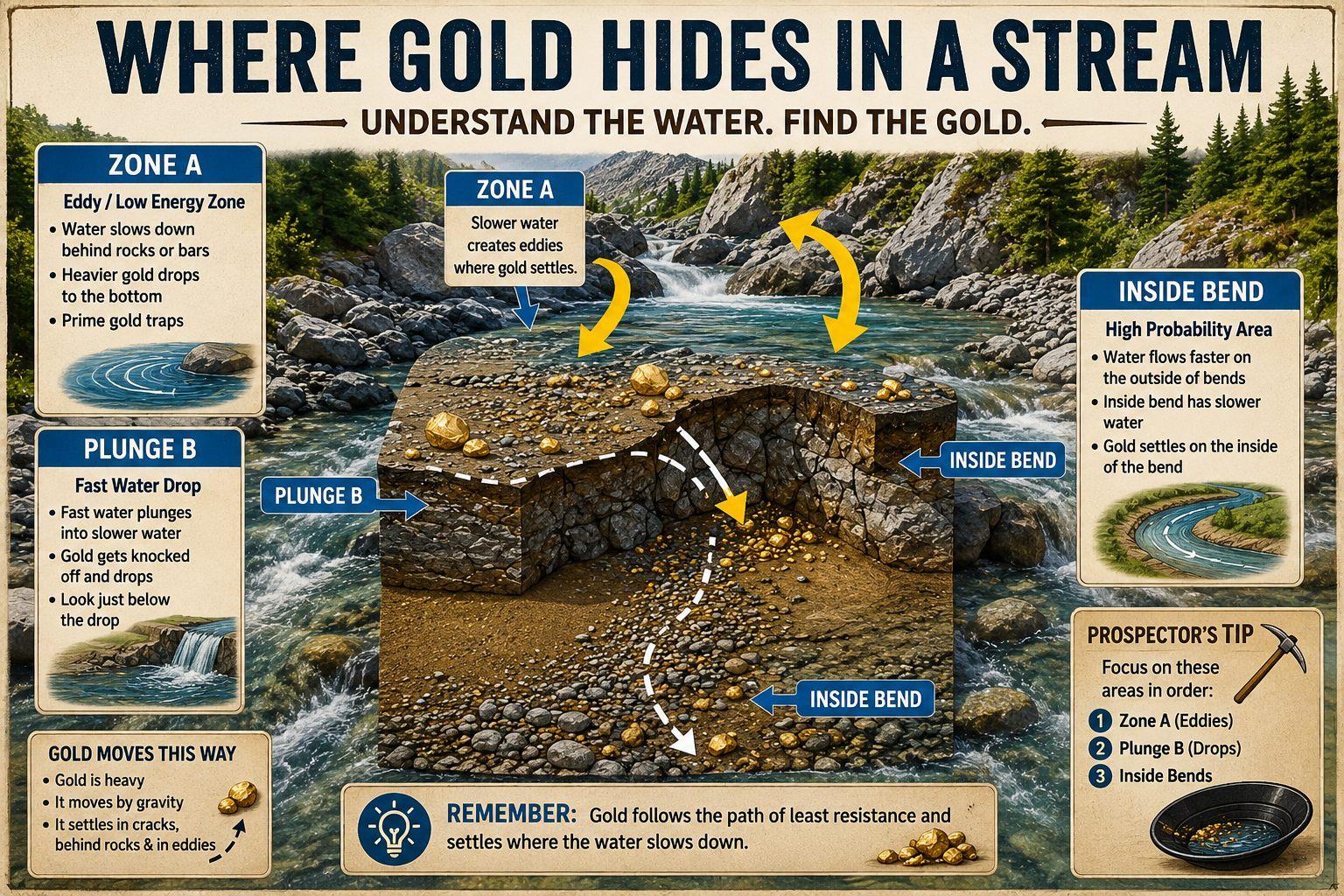
Clean generated story image
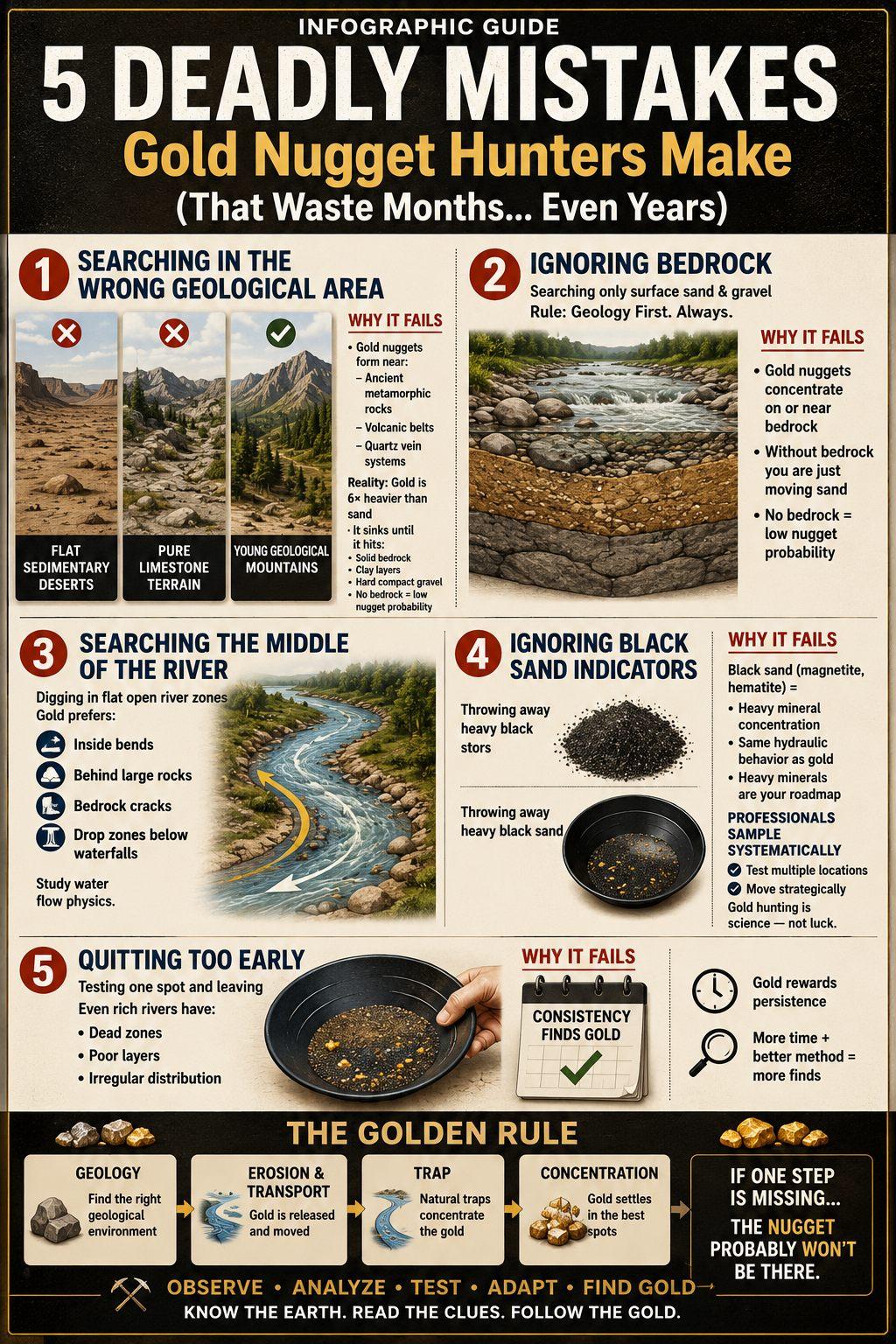
Water and heavy material
A cleaned story image from the generated set: water slows, heavies drop, then PFA explains the field check.
Beginner: Gold is heavy. Start by looking for places where water or wash slows down enough for heavy material to drop.
Pro: Inside bends, bedrock cracks, clay breaks, false bottoms, riffles, low-pressure pockets, and old channel edges are stronger than random rough ground.
Layer order
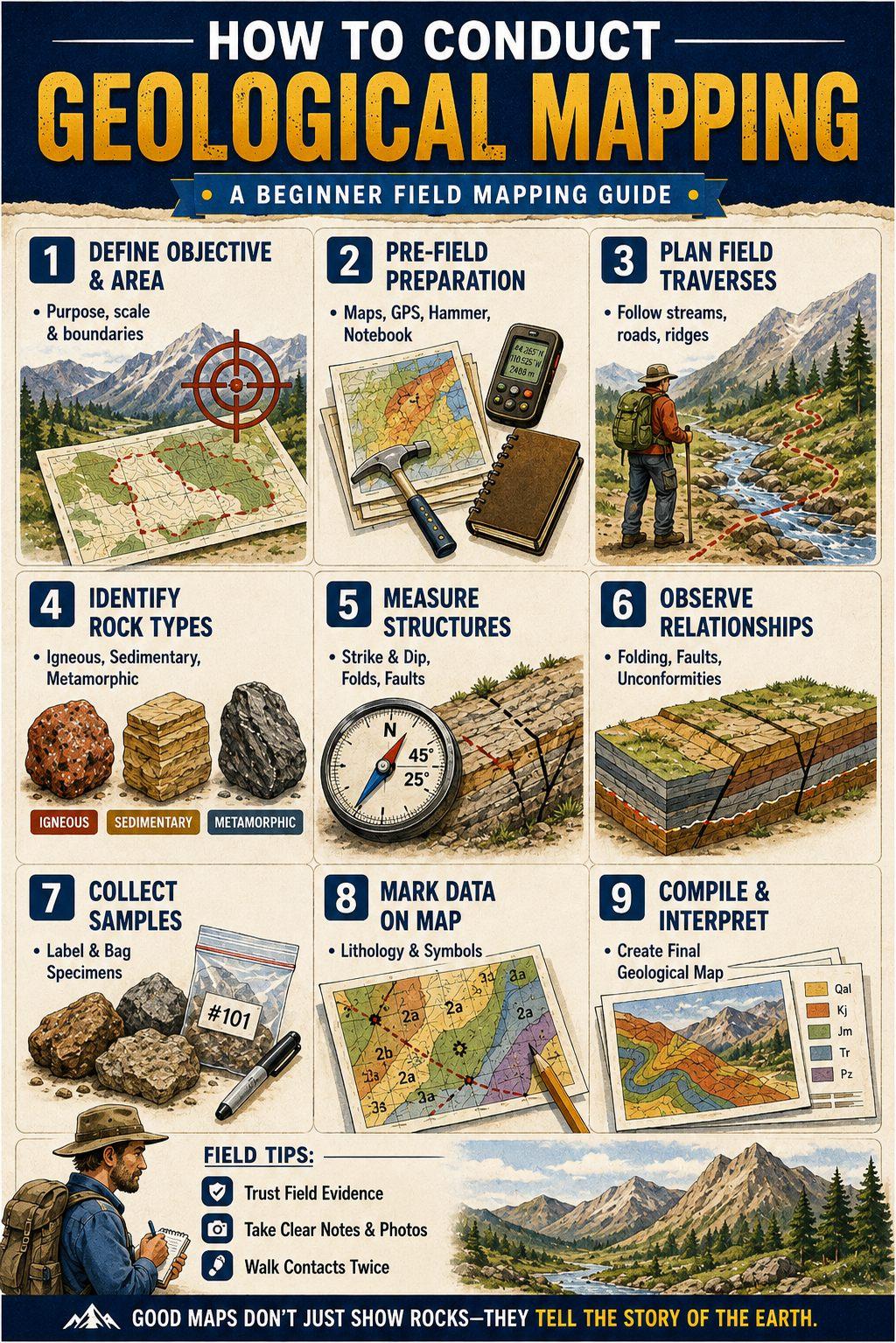
Clean generated story image
Layer thinking
Use the image as the teaching cue; the written lesson explains why LiDAR and overlays need a clean order.
Beginner: Use grey hillshade as the quiet bottom layer when you want shape, ridges, gullies, flats, and old channels to stand out.
Pro: Keep LiDAR below tenure, faults, soil markers, and target pins so the landform remains readable while overlays add evidence above it.
New Zealand
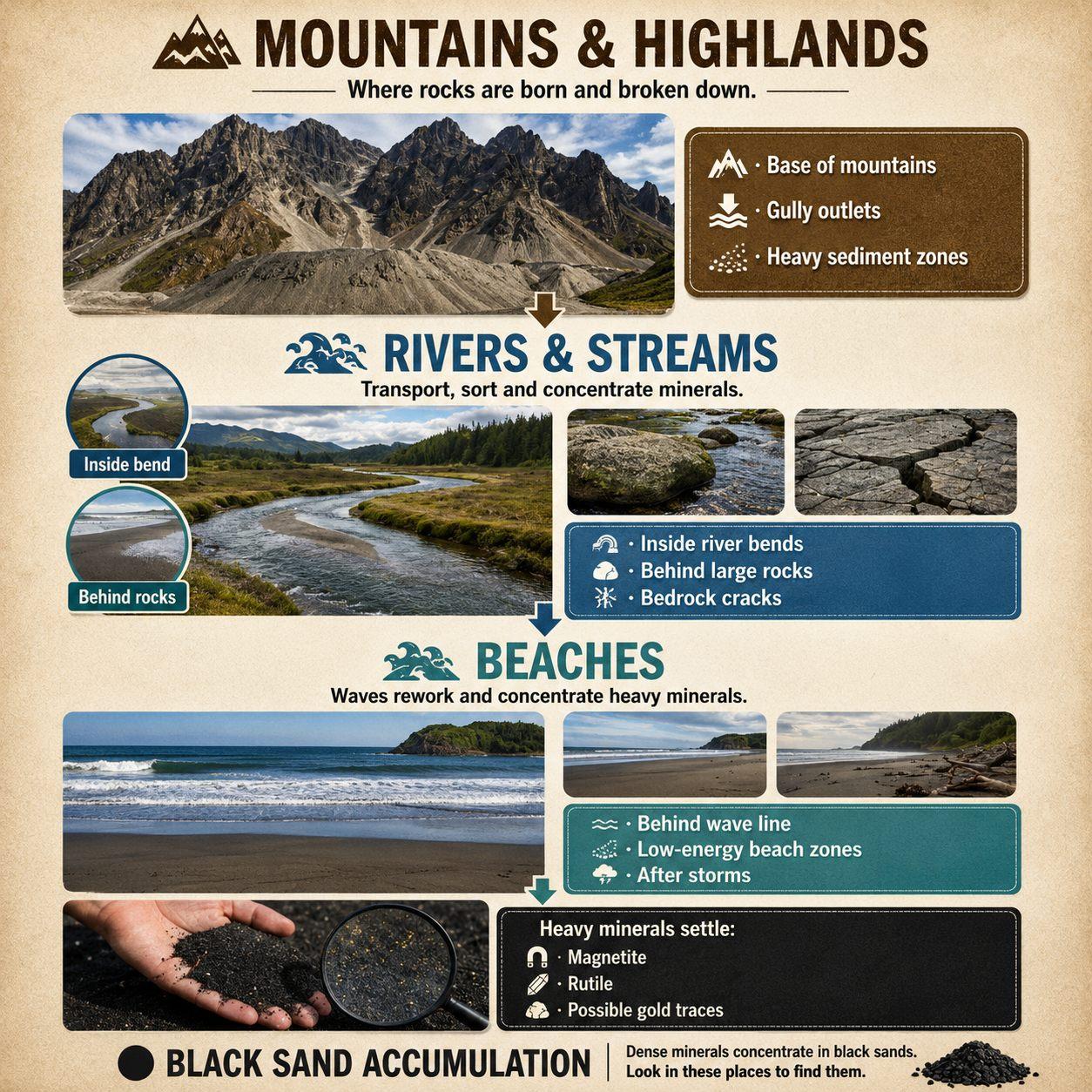
Clean generated story image
Waterline movement
Creeks, beaches, flood lines, and old water paths move the clue line over time.
Beginner: In New Zealand, start with listed public gold fossicking areas and panning. Do not treat any creek, reserve, or beach as open just because it looks promising.
Pro: Check NZPAM permit context, DOC access limits, land access, tool rules, active creek-bed limits, and heritage/cultural restrictions before detector work enters the plan.
UK / EU
Clean generated story image
Layer thinking
Use the image as the teaching cue; the written lesson explains why LiDAR and overlays need a clean order.
Beginner: LiDAR can reveal old tracks, banks, hollows, mining remains, and drainage shapes, but it does not give you the right to enter, detect, dig, or publish target pins.
Pro: Run LiDAR clues through land permission, protected-site checks, club rules, heritage sensitivity, data licence, attribution, and finds/reporting duties before any field action.
Geochem
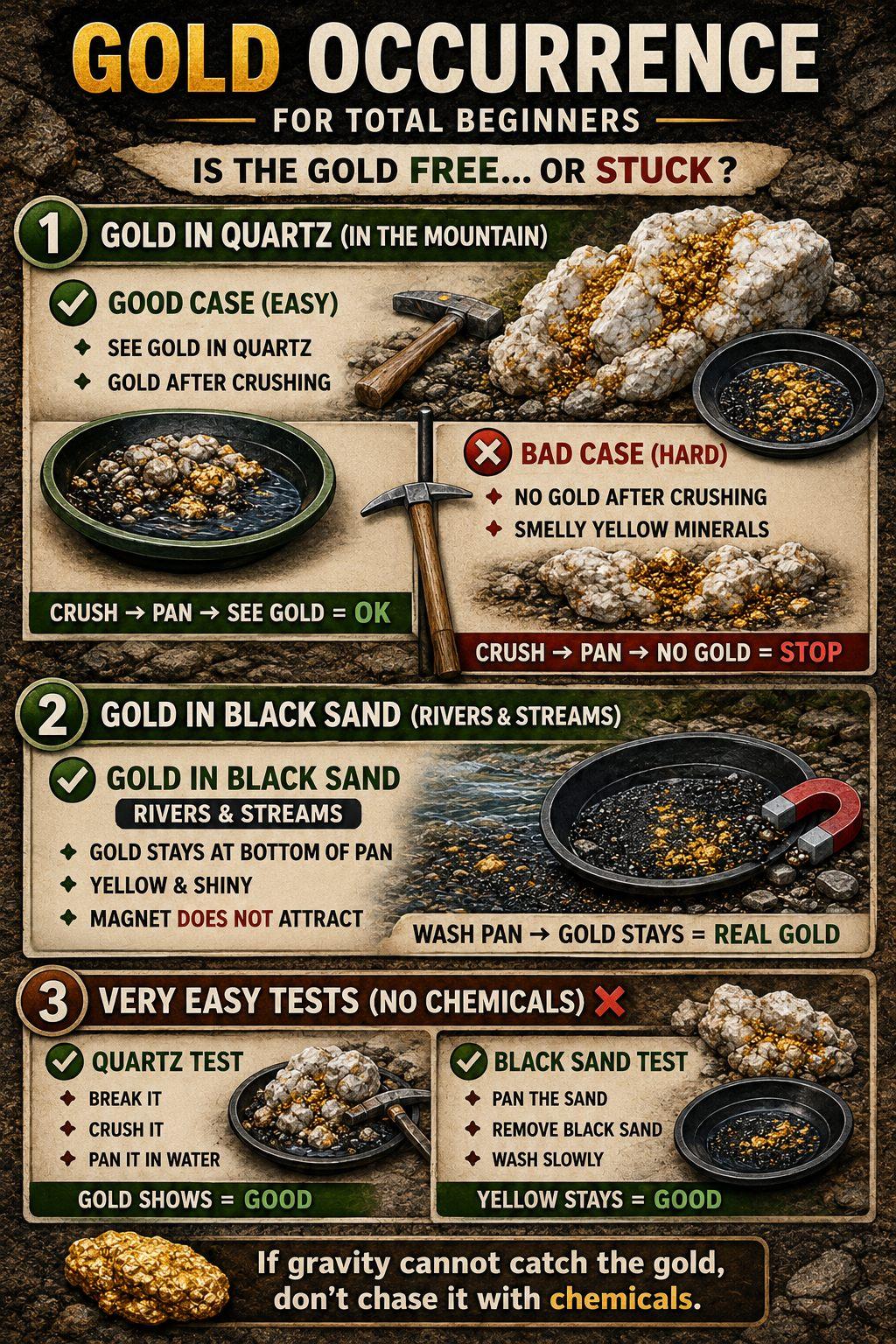
Clean generated story image
Gold clue checks
The image supports the idea that a bright clue still needs testing, context, and careful notes.
Beginner: A higher soil result is a clue, not a guarantee. It says the area deserves attention, not that gold is sitting under the dot.
Pro: Rank soil points into simple high, mid, and watch bands, then compare them with structure, drainage, tenure, and local geology.
Tenure
Clean generated story image
Access caution
The field lesson stays clear: no clue matters until access, permission, and local rules are checked.
Beginner: A tenement boundary is not just a coloured line. It can decide whether you can walk, ask first, or avoid the ground.
Pro: Active, pending, expired, surrender, renewal, and application timing can change what is worth watching, but access still needs confirmation.
Structure
Clean generated story image
Structure story
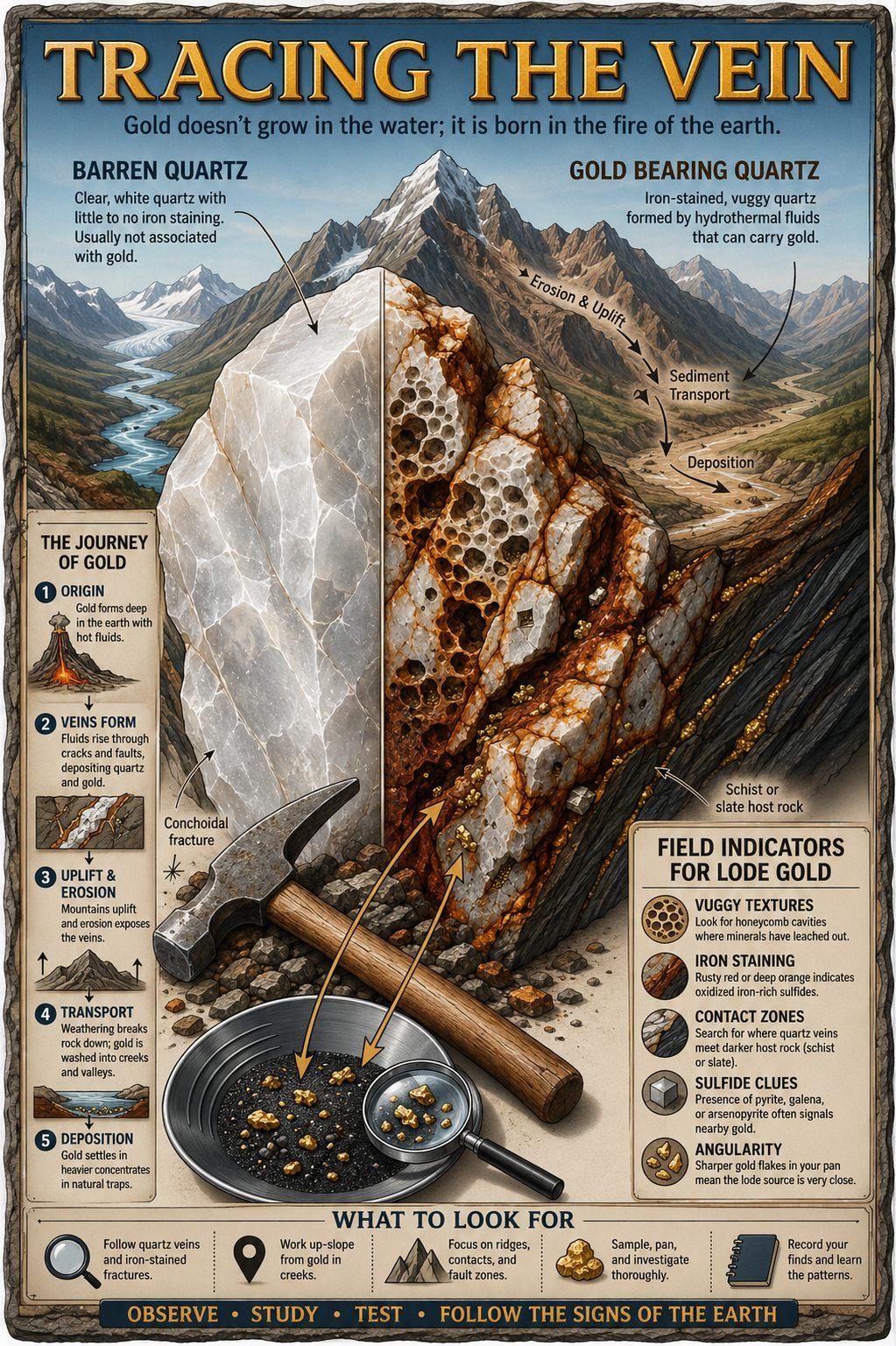
Faults, veins, cracks, and contacts are planning evidence, not a promise of a target.
Beginner: Fault lines and geology contacts can show where the ground changed, broke, or gave fluids a path.
Pro: Prioritise intersections, bends, lithology changes, shears, and breaks that also line up with geochem, workings, or sensible drainage.
Detector control
Clean generated story image
Detector behaviour
The image carries the caution mood while PFA explains setup, threshold, EMI, and ground response below.
Beginner: If the detector is noisy, slow down before you blame the ground. A smooth threshold teaches more than a machine running too hot.
Pro: Sensitivity, threshold, ground balance, coil size, swing height, and EMI control should be logged against the ground type that caused the change.
Mineral indicators
Clean generated story image
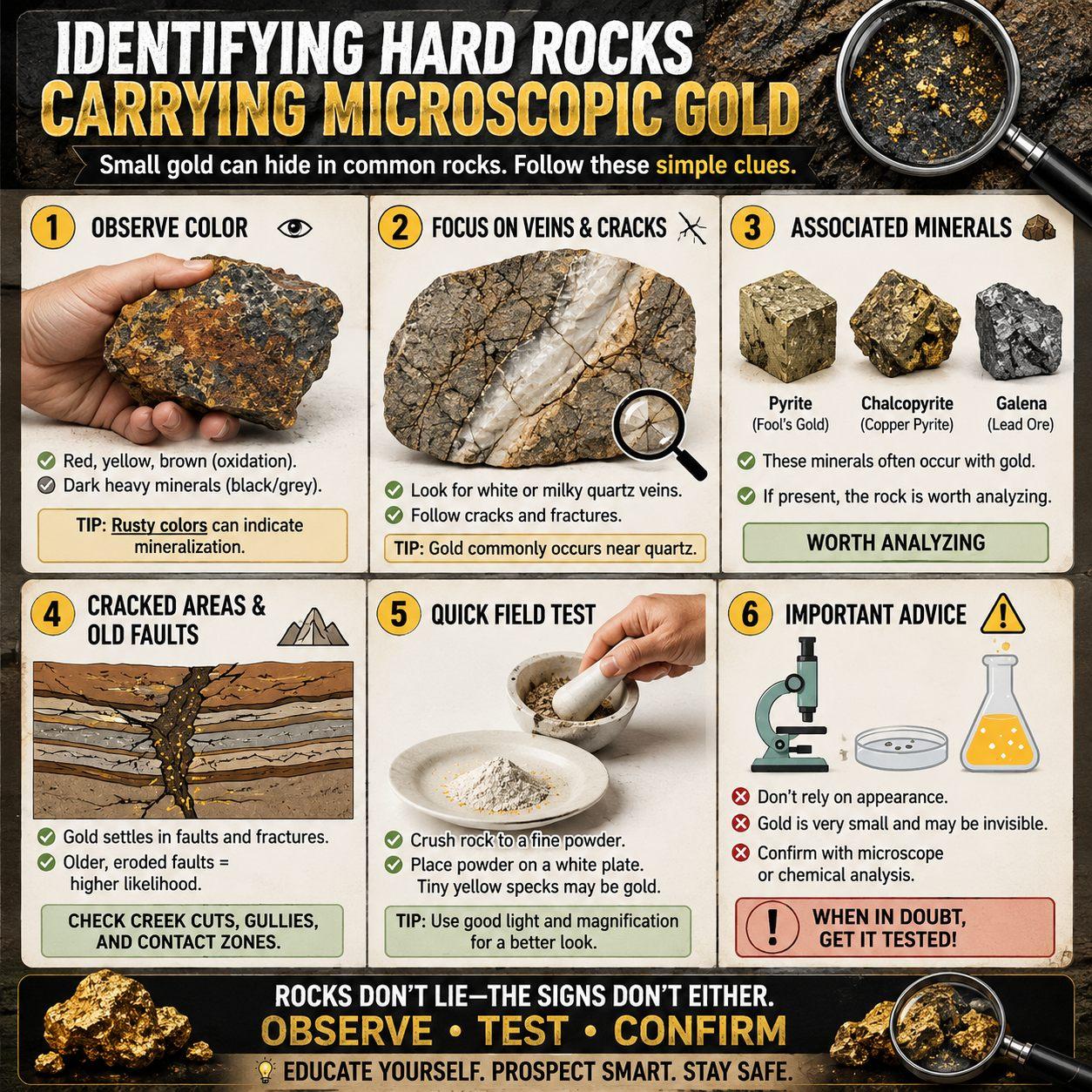
Hard-rock clues
Rust, quartz, sulphides, and fracture patterns become useful only when checked and recorded properly.
Beginner: Mineral colour and rock type can point you toward interesting ground, but a rusty rock by itself is not a gold signal.
Pro: Treat quartz, ironstone, gossan caps, veining, alteration, and old workings as a pattern. The stronger clue is where several line up.
Heavy mineral sorting
Clean generated story image
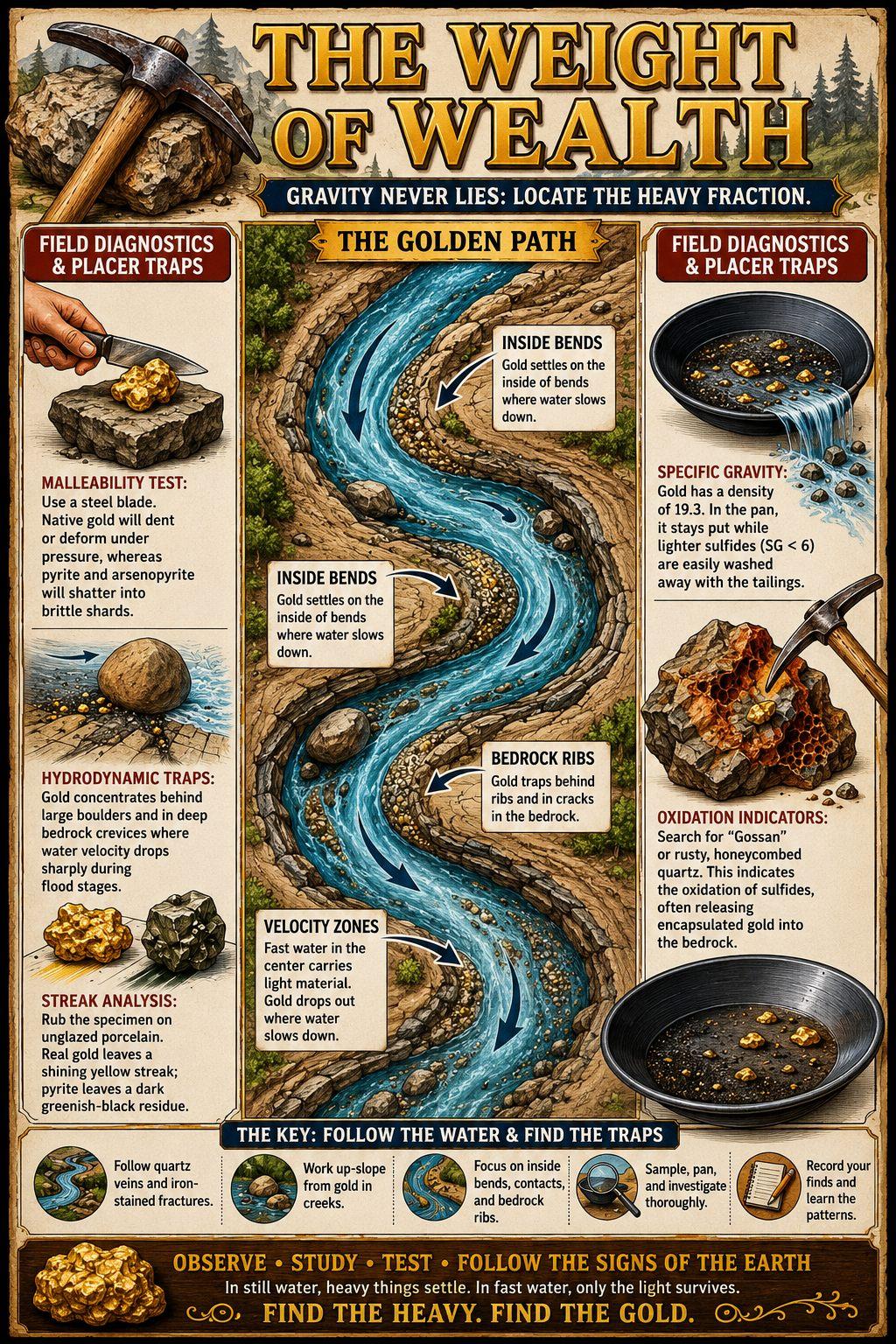
Heavy mineral sorting
Black sand and other heavies are a sorting clue, not proof by themselves.
Beginner: Black sand is a sign that heavy material has collected. It does not prove gold, but it says the spot deserves a closer read.
Pro: Look for black-sand streaks where water slows, behind obstructions, along beach bands, in inside bends, and at bedrock or clay traps.
Buried ground
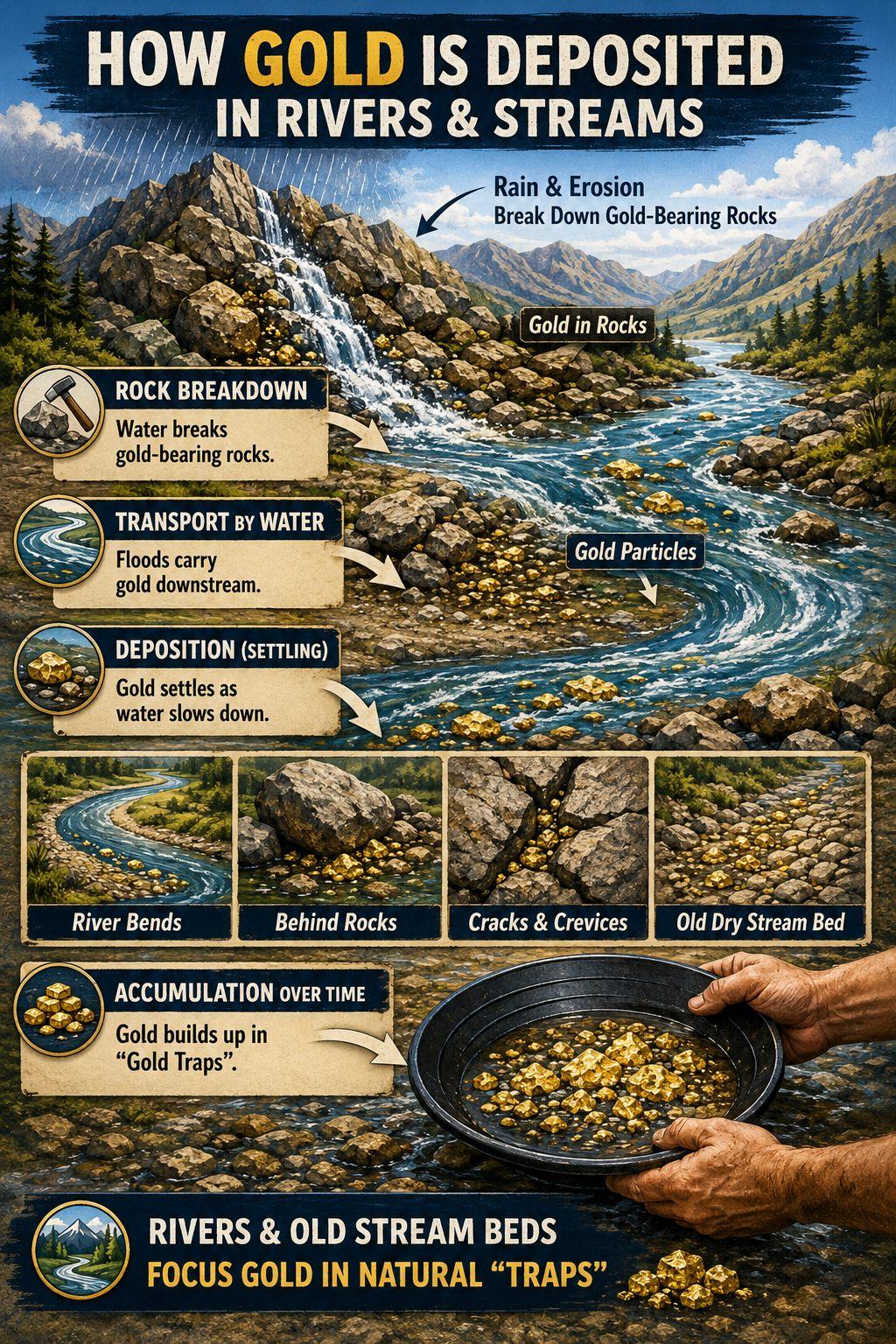
Clean generated story image
Covered wash
Old channel ideas need terrain, drainage, geology, and field notes to become useful evidence.
Beginner: Good ground can be hidden under soil, clay, or later wash. Flat boring ground can still be part of an old drainage story.
Pro: Prioritise buried channels, palaeo-drainage edges, clay breaks, terrace gravels, and false bottoms when LiDAR and geology support the shape.
Detector behaviour
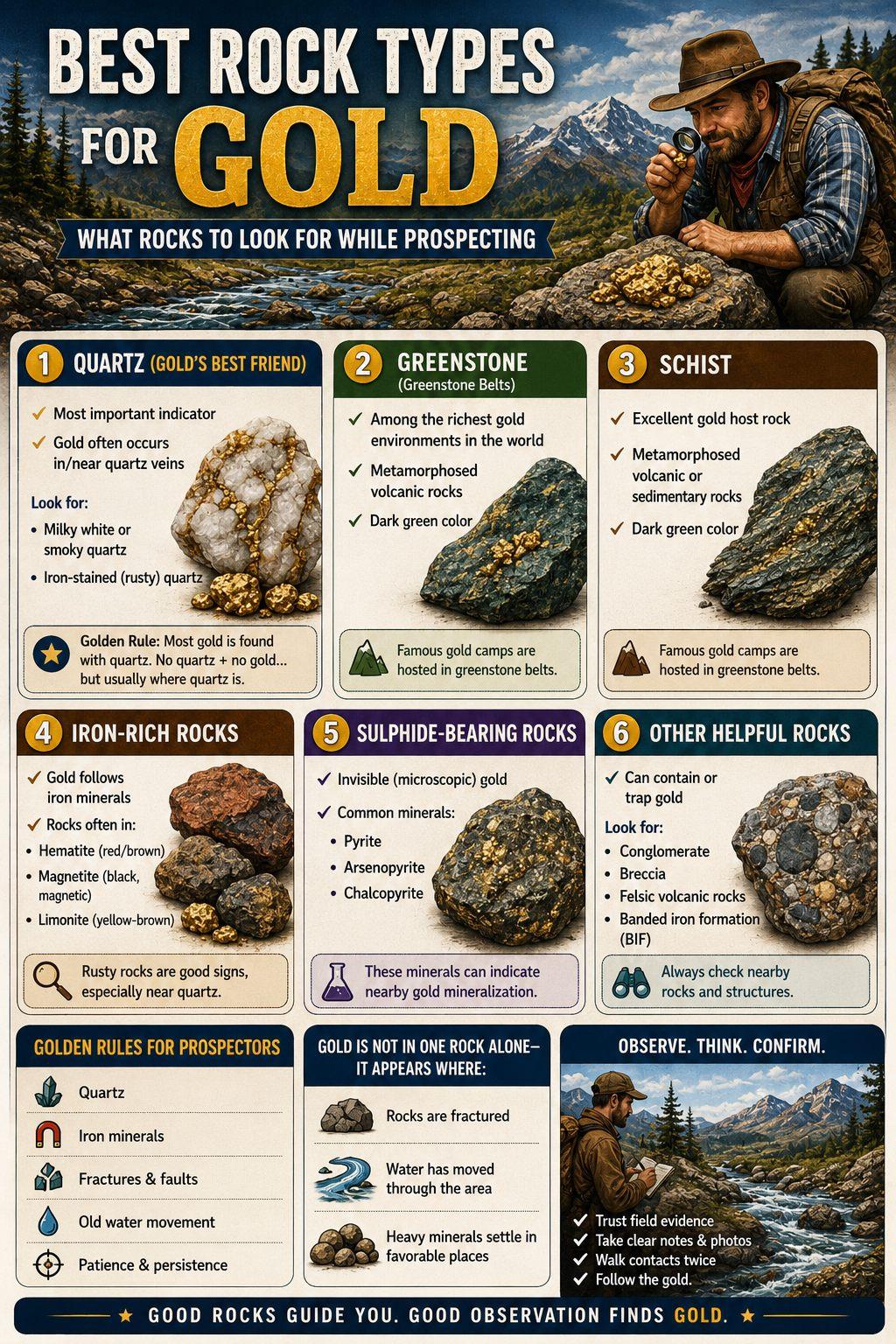
Clean generated story image
Noisy ground clues
Mineralised rocks and false signals belong in the setup memory, not just in the frustration pile.
Beginner: If the detector keeps chattering, the ground may be mineralised or the setup may be too hot for the patch.
Pro: Log hot rocks, EMI, wet soil, threshold drift, ground balance changes, and false signals against the coil and settings used.
Beach and creek edges
Clean generated story image
Waterline movement
Creeks, beaches, flood lines, and old water paths move the clue line over time.
Beginner: Where moving water slows or changes direction, heavy material can settle into a line, pocket, or low-energy corner.
Pro: Read flood lines, beach cuts, waterline shelves, gravel tails, inside bends, and back eddies as temporary sorting machines.
Coil choice
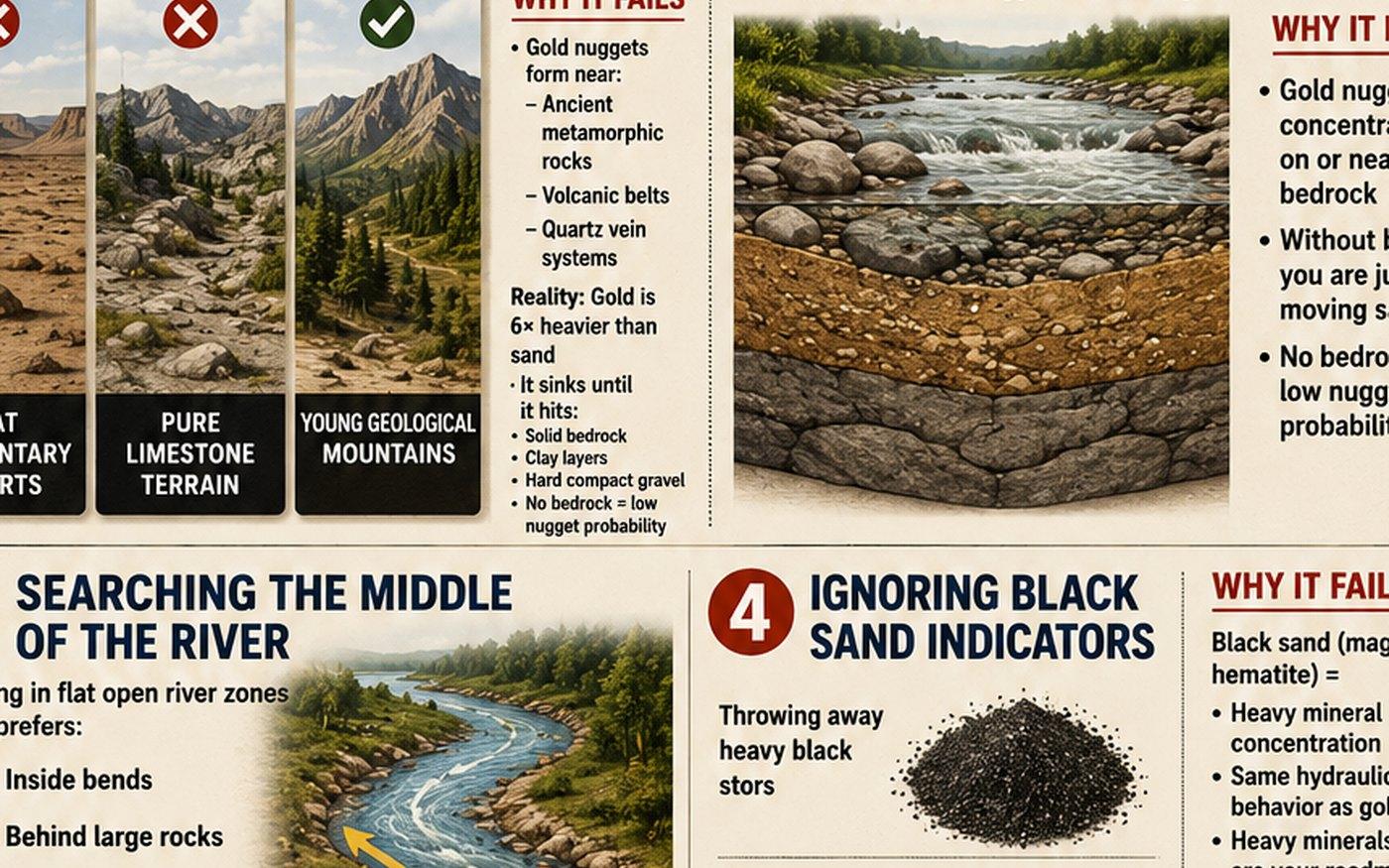
Clean generated story image
Choose the tool for the ground
The lesson underneath explains that the right coil is the one that fits the ground, not always the biggest one.
Beginner: A bigger coil is not always better. Tight trashy or mineralised ground often needs a steadier, easier coil first.
Pro: Match coil size and shape to cover, trash, depth goal, mineralisation, sweep space, and whether the day is scouting or cleaning up.
Website first
The website can carry the richer explanations and future diagrams. The app should only show the short field version when the user needs it: what this clue means, why it matters, and what to tap next.
Rollout rule
Website carries the deeper field guide because it can hold more explanation, examples, and source notes.
Android app gets short offline cards and tap-through help so the map stays fast in the field.
Website visitors get the deeper guide pages while the Android app keeps the field workflow fast.
Original saved images stay out of the public product unless permission is proven.